Guide contents
Engineering history
Choose a design without changing the editor
Open Workspace / Project history (Ctrl+Alt+H). From chat Focus this returns to engineering. Choose an active design or alternative in the left rail; in narrow layouts use the top selector. Filter by name or switch Active/Archived. Load the next page explicitly. Inspection does not open a working design, change Original, or move Main.
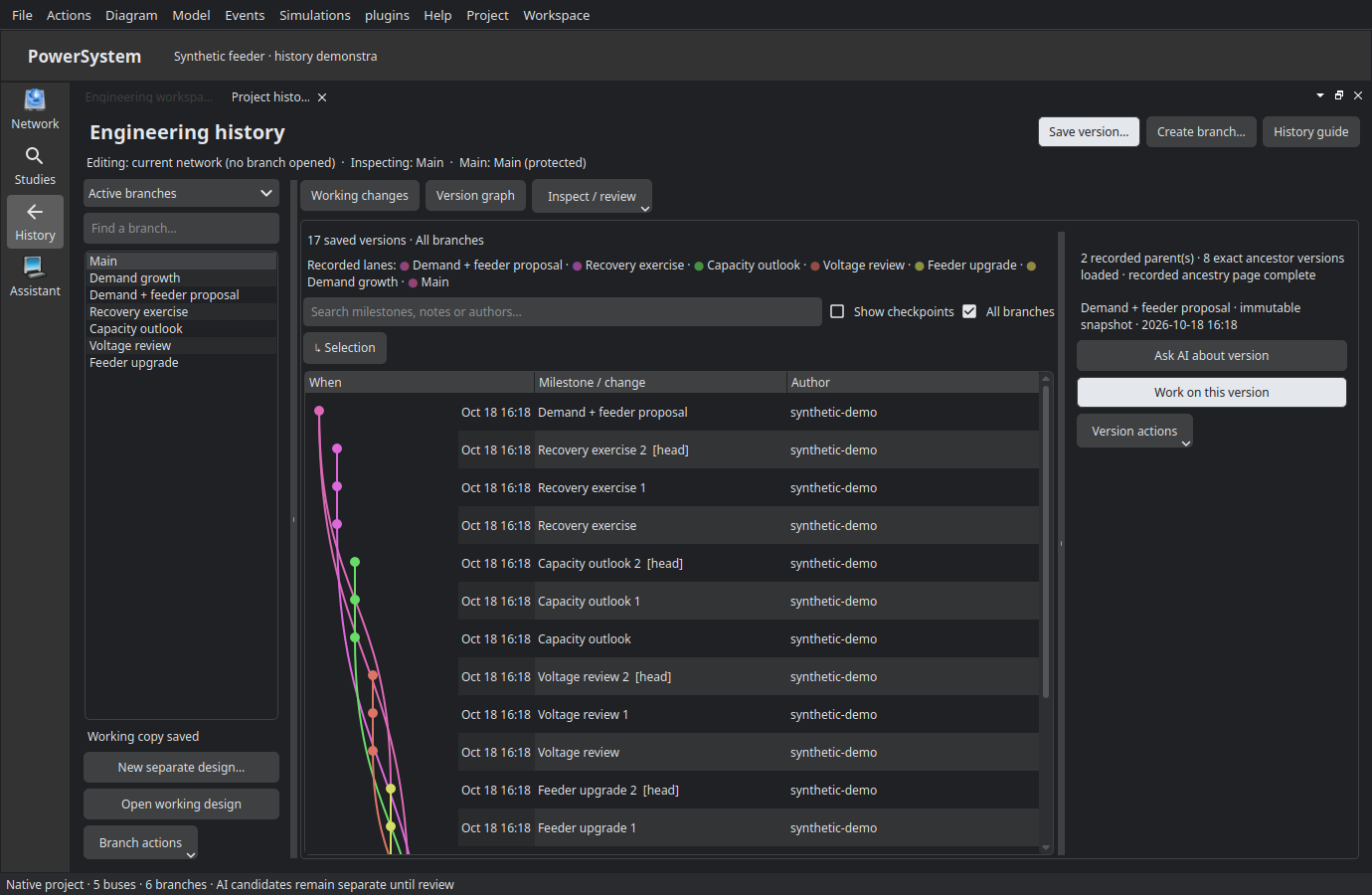
Read the timeline
Each row is a retained immutable version, named milestone or checkpoint. Search notes/authors/milestones, enable Show checkpoints when needed and load earlier history explicitly. The ancestry gutter draws only recorded parent relationships. A dashed stub means a parent is outside the loaded timeline; it is not a guessed connection to the next row. Select a row to inspect full IDs and recorded parents. Load earlier lineage for additional ancestors. Checkpoints are private retention, not human acceptance.
Inspect and continue
Wide windows show version details beside the timeline; smaller ones use Version details and Back to timeline. Ask AI prepares an unsent read-only Plan bound to that exact snapshot. Work on this version prepares detached Build work; neither changes the editor or Main. Save milestone gives a meaningful label. Restore as new creates a separate alternative, never rewrites history.
Working designs and portable review
Open working design is an explicit editor switch after preserving current work. Create alternative retains ancestry from the exact source. Rename/archive change organization, not immutable bytes; archived designs are read-only. Share/import review uses explicit destination/source consent. An imported version carries evidence, not approval or automatic activation.
Compare and review
Pin Before and After using exact versions from timelines, open Compare and request comparison. Swap reverses direction; it must invalidate old results. Inspect native values, attribution and before/after views. Undo creates a proposal. Review for Main is a separate human-review path. See Combining and Evidence.
Workspace navigation and working changes
Use History in the left engineering workspace rail, the Project menu or Ctrl+Alt+H. The central workspace replaces the old Changes modal. Network returns to the engineering editor; Assistant can be opened alongside history when needed.
Version graph shows All branches by default in the native app. Branch names, recorded authors, named versions, head markers and multi-parent connections come from the project ledger. Checkpoints remain collapsed until explicitly enabled. The graph displays at most 200 versions at once; earlier pages replace a full window. Missing parents remain explicit stubs, never guessed links.
Working changes compares a branch's retained working copy with its last named version (or its initial version if none has been named). Automatic recovery checkpoints do not make these changes disappear. Unretained editor edits are identified separately. Added, modified and removed equipment are grouped; native MW, MVAr, kV, pu and admitted MVA ratings are not converted or guessed. Large structured values are marked summaries rather than presented as complete values.
Open working design explicitly before editing or saving that branch. Enter a version title and optional description, then choose Save version. It captures an immutable whole-model version and names it; it does not stage individual files, approve engineering, apply to Original or incorporate into Main. Create branch uses the selected exact saved version. An untracked project instead shows Start project history; browsing alone does not manufacture a history. When history already exists, New separate design instead retains the current editor as a disconnected design root. It is not a branch from the selected version: use Create branch for shared ancestry. Review retention before the editor switches; existing branches and protected Main remain unchanged.
The typed versioning_project_history AI tool reads this same account/project history. Ask AI and Work on this version prepare an unsent exact-version handoff; no inference starts just because History was opened.
Open a populated example
Project → Open populated History example… opens a separate synthetic project directly in the branch graph. It does not replace your network or owner preferences. See Explore the populated example for its exact data, seven branches, named versions, working MW/MVA changes, combination and recovery exercises. This is real retained history, not a fabricated screenshot or engineering approval.